
Profit per BOQ item
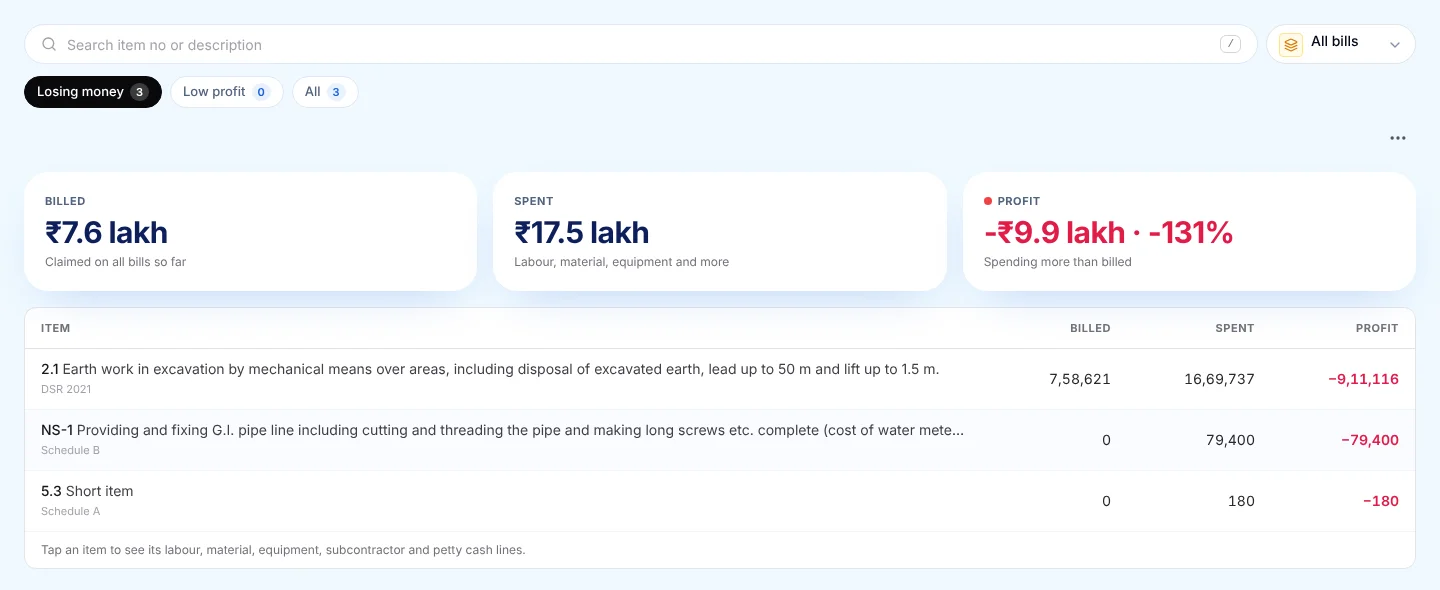
See profit and loss for every BOQ item
Short answer
Profit per BOQ item is what you billed for that item minus what you spent on it: labour, material, equipment, subcontractor and petty cash. PRIME ERP works it out from the RA bills and costs you already enter.
1 · Load BOQ
Import your BOQ items from Excel with quantity and rate, or type them in.
2 · Link costs
Wages, purchases and subcontractor bills are linked to the BOQ item they were spent on.
3 · Read profit
"Losing money" items show first. Tap an item to see every cost line behind it.
Why one project total is not enough
A project can show a healthy profit overall while two or three items lose money on every bill. The good items hide the bad ones until the final bill, when it is too late to change the rate, the method or the gang. Profit per item shows each one separately while the work is still running.
| Item (example figures) | Billed | Spent | Profit |
|---|---|---|---|
| 2.1 RCC M25 in footings and columns | ₹5,75,000 | ₹3,81,000 | ₹1,94,000 (33.7%) |
| 3.1 Brick masonry in CM 1:6 | ₹2,50,100 | ₹2,59,300 | −₹9,200 (losing money) |
| Both items together | ₹8,25,100 | ₹6,40,300 | ₹1,84,800 (22.4%) |
Together the two items make 22.4%, which looks fine. Item by item, the brick masonry costs more than it bills.
Example: where the spent figure comes from
Billed  62.5 m³ × ₹9,200          ₹5,75,000

Cement (purchases)                ₹1,72,500
Sand, aggregate (purchases)         ₹98,000
Labour (attendance wages)           ₹86,400
Mixer, vibrator (hire)              ₹18,000
Site expenses (petty cash)           ₹6,100
                                 ──────────
Spent                             ₹3,81,000
Profit                            ₹1,94,000
Each cost line is the bill, wage or expense you already entered, linked to the BOQ item it was spent on. Tap the item to see every line behind the total.
Costs that are not linked to an item
A purchase or a machinery bill entered without a BOQ item is not dropped. It shows in its own "Costs not linked to any BOQ item" row, so the project total still adds up. "Link with AI" suggests an item from your own BOQ for those lines; it never changes an amount.
What you can do with it
- Pick "Whole project" for profit to date, or one RA bill to see that bill alone.
- Filter "Losing money" and "Low profit" (under 10%) to see the items that need attention first.
- Download the list to Excel, or save a bill's profit and loss for your books.
Excel sheet vs PRIME ERP
| Excel sheet | PRIME ERP | |
|---|---|---|
| Costs per item | Typed again by hand | Comes from the bills, wages and purchases you already enter |
| When you see a loss | Often after the project ends | While the item is still running |
| Which bill | One sheet per bill | Pick one RA bill or all bills |
Questions
What is profit per BOQ item?
It is the amount billed for one BOQ item minus everything spent on that item: labour, material, equipment, subcontractor and site expenses.
Do I need an accountant to see it?
No. It fills itself from the RA bills, wages, purchases and subcontractor bills you already enter in PRIME ERP.
Does it work for private and government work?
Yes. It works for any BOQ with quantities and rates, whether the client is a builder, a private owner or a government department.
Can I see it on my phone?
Yes. The same screen works in a phone browser.