
RA bill software
Make RA bills from your BOQ and measurements
Short answer
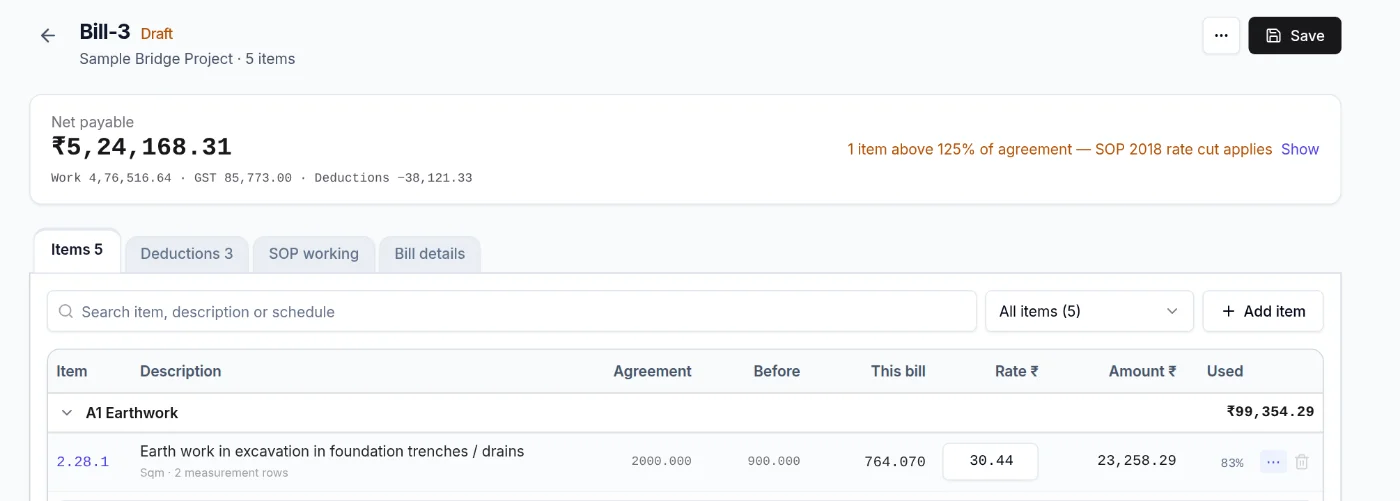
An RA (running account) bill claims the work done since the last bill, item by item against the BOQ. PRIME ERP brings in the measurements, carries the previous quantities, flags the SOP 2018 rate cut above 125% of agreement, and adds GST and deductions to give the net payable.
1 · Measure
Record measurements in the eMB, or fill quantities from daily progress.
2 · Make the bill
A new bill brings in its measurements. Previous quantities and % used fill themselves.
3 · Check and send
See SOP working, GST and deductions, then download the bill as PDF or Excel.
What each column of an RA bill means
Every running account bill carries the same columns for each BOQ item. Most mistakes come from one of them being typed again instead of carried over.
| Column | What it holds |
|---|---|
| Agreement quantity | The quantity in the agreement or the sanctioned variation |
| Previously billed | Total of this item on all earlier bills |
| This bill | Quantity measured since the last bill |
| Up to date | Previously billed plus this bill |
| Rate | Agreement rate, or the reduced SOP rate above 125% |
| Amount | This bill quantity times the rate |
| % used | Up to date as a percentage of the agreement quantity |
Measurements feed the bill
Each measurement row keeps the count and the dimensions, so the engineer checking the bill can follow how the quantity was reached. Here 20 footing pits of 2.5 m × 2.5 m × 1.6 m give 200 m³, and the bill picks up 200 m³ for item 1.1.

Example: an item that crosses 125% of agreement
An NS item is checked against its own agreement quantity. SOR items are checked at schedule-group level, so an overrun on one item can be absorbed by savings elsewhere in the same group.
Previously billed            380 m³
Up to date                   540 m³ (135%)
This bill                    160 m³

Up to 125%  120 m³ × ₹9,200 = ₹11,04,000.00
125-140%     40 m³ × ₹9,016 =  ₹3,60,640.00
                              ─────────────
Work value this bill          ₹14,64,640.00
Only the 40 m³ above 500 m³ is paid at 98% of the rate (₹9,016). The rest of this bill keeps the full rate.
From work value to net payable
Work value                 ₹14,64,640.00
GST 18%                   + ₹2,63,635.20
                           ─────────────
Gross bill                 ₹17,28,275.20

Income-tax TDS (194C) 2%    − ₹29,292.80
GST TDS 2%                  − ₹29,292.80
BOCW cess 1%                − ₹14,646.40
Security deposit 5%         − ₹73,232.00
                           ─────────────
Net payable                ₹15,81,811.20
Both TDS amounts come back as tax credit and the security deposit is released after the maintenance period. Only the cess is a true cost. Some departments charge cess or security deposit on the gross bill instead, so check the deduction clause in your agreement.
Mistakes it stops
- A previous quantity copied wrong from the last bill, which then repeats on every later bill.
- An item billed past 125% of agreement at the full rate, which the department cuts and sends back.
- A bill quantity that does not match the measurement book.
- A bill changed after approval. Approved bills are locked.
Excel RA bill vs PRIME ERP
| Excel | PRIME ERP | |
|---|---|---|
| Previous quantities | Copied from the last bill by hand | Carried forward for every item |
| Over 125% of agreement | Easy to miss | Flagged on the bill with the SOP 2018 working |
| Measurements | A separate sheet | Brought in from the eMB |
Questions
What is an RA bill?
A running account bill is a part payment claim for work done so far. Each bill shows, for every BOQ item, the quantity billed before, the quantity in this bill and the total to date.
Does PRIME ERP handle the SOP 2018 rate reduction?
Yes. When an item goes above 125% of its agreement quantity, the bill shows it and the SOP working tab shows the reduced rate.
Can I add GST and deductions?
Yes. GST is added to the work value, and TDS, cess, security deposit and your own deductions sit on the Deductions tab. The net payable shows at the top of the bill.
Can I download the bill?
Yes. The bill and its measurements download as PDF, and the bill also exports to Excel.